To change the background click on the label bar and in the layer window select the style tab.
Choose a source from the background top tab then upload an image or pick a background color.


To change the background click on the label bar and in the layer window select the style tab.
Choose a source from the background top tab then upload an image or pick a background color.

To add a layer, click the green plus button in the left sidebar and select the type of layer.
Select any layer and you can edit its content and style properties in the layer window.


To change the background click on the label bar and in the layer window select the style tab.
Choose a source from the background top tab then upload an image or pick a background color.

To add a layer, click the green plus button in the left sidebar and select the type of layer.
Select any layer and you can edit its content and style properties in the layer window.

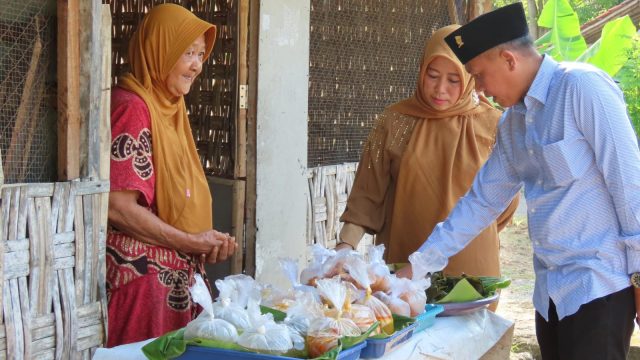
YAKUSA.ID — Anggota DPR RI Komisi VIII Fraksi PDI Perjuangan Dapil Madura, Hj Ansari, menyempatkan diri mendatangi seorang pedagang kecil bernama Ibu Ismail di Jalan Raya Desa Bunder, Kecamatan Pademawu, Kabupaten Pamekasan, Rabu sore (11/06/2026). Kunjungan itu dilakukan setelah ia melihat video aktivitas Ibu Ismail berjualan makanan berbuka puasa yang viral di media sosial. Di […]