To change the background click on the label bar and in the layer window select the style tab.
Choose a source from the background top tab then upload an image or pick a background color.


To change the background click on the label bar and in the layer window select the style tab.
Choose a source from the background top tab then upload an image or pick a background color.

To add a layer, click the green plus button in the left sidebar and select the type of layer.
Select any layer and you can edit its content and style properties in the layer window.


To change the background click on the label bar and in the layer window select the style tab.
Choose a source from the background top tab then upload an image or pick a background color.

To add a layer, click the green plus button in the left sidebar and select the type of layer.
Select any layer and you can edit its content and style properties in the layer window.

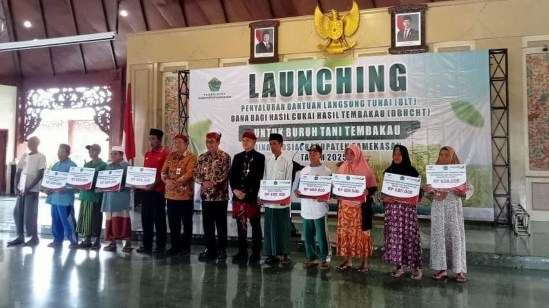
YAKUSA.ID – Pemerintah Kabupaten (Pemkab) Pamekasan, Madura, Jawa Timur menyalurkan bantuan langsung tunai (BLT) dari Dana Bagi Hasil Cukai Hasil Tembakau (DBHCHT) kepada para petani tembakau, Senin (3/11/2025). Penyerahan bantuan dilakukan secara simbolis oleh Bupati Pamekasan, Kholilurrahman, di Mandhapa Aghung Ronggosukowati. Kepala Dinas Sosial Kabupaten Pamekasan, Herman Hidayat Santoso, menjelaskan bahwa bantuan sebesar Rp600 ribu […]