To change the background click on the label bar and in the layer window select the style tab.
Choose a source from the background top tab then upload an image or pick a background color.


To change the background click on the label bar and in the layer window select the style tab.
Choose a source from the background top tab then upload an image or pick a background color.

To add a layer, click the green plus button in the left sidebar and select the type of layer.
Select any layer and you can edit its content and style properties in the layer window.

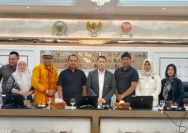
YAKUSA.ID – Himpunan Mahasiswa Islam (HMI) Komisariat Pakuan Cabang Kota Bogor periode 2026–2027 resmi dilantik dalam prosesi yang berlangsung di Gedung Serba Guna DPRD Kota Bogor, Minggu (14/6/2026). Pelantikan tersebut mengusung tema “Transformasi Nilai PUNK Menuju Era Digitalisasi” sebagai komitmen organisasi dalam menghadapi perkembangan zaman tanpa meninggalkan nilai-nilai dasar perjuangan. Kegiatan itu dihadiri jajaran pengurus […]