To change the background click on the label bar and in the layer window select the style tab.
Choose a source from the background top tab then upload an image or pick a background color.


To change the background click on the label bar and in the layer window select the style tab.
Choose a source from the background top tab then upload an image or pick a background color.

To add a layer, click the green plus button in the left sidebar and select the type of layer.
Select any layer and you can edit its content and style properties in the layer window.


To change the background click on the label bar and in the layer window select the style tab.
Choose a source from the background top tab then upload an image or pick a background color.

To add a layer, click the green plus button in the left sidebar and select the type of layer.
Select any layer and you can edit its content and style properties in the layer window.


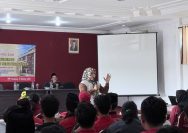
YAKUSA.ID — SMP Integral Luqman Al Hakim Sumenep menggelar kegiatan Malam Bina Iman dan Taqwa (Mabit) khusus putri dengan mengusung tema “Muslimah Hebat, Ibadah Kuat, Ukhuwah Erat.” Kegiatan tersebut berlangsung di lingkungan SMP Integral Luqman Al Hakim Sumenep dan diikuti seluruh siswa putri, tim manajemen, serta seluruh ustazah sekolah. Mabit merupakan salah satu kegiatan rutin […]