To change the background click on the label bar and in the layer window select the style tab.
Choose a source from the background top tab then upload an image or pick a background color.


To change the background click on the label bar and in the layer window select the style tab.
Choose a source from the background top tab then upload an image or pick a background color.

To add a layer, click the green plus button in the left sidebar and select the type of layer.
Select any layer and you can edit its content and style properties in the layer window.


To change the background click on the label bar and in the layer window select the style tab.
Choose a source from the background top tab then upload an image or pick a background color.

To add a layer, click the green plus button in the left sidebar and select the type of layer.
Select any layer and you can edit its content and style properties in the layer window.


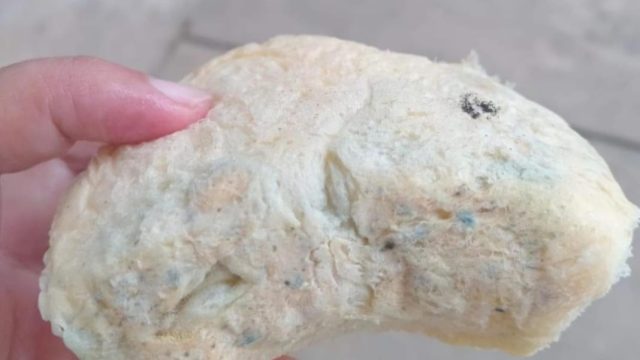
YAKUSA.ID — Program Makan Bergizi (MBG) di Kecamatan Ambunten kembali menjadi sorotan. Seorang wali murid mengeluhkan roti berjamur yang diterima anaknya dari Dapur MBG Yayasan Garuda Jaya. Foto roti tersebut beredar luas di grup orang tua dan memicu kekhawatiran. Bagi para wali murid, persoalannya bukan soal nilai bantuan, melainkan soal kelayakan makanan yang dikonsumsi anak-anak. […]