To change the background click on the label bar and in the layer window select the style tab.
Choose a source from the background top tab then upload an image or pick a background color.


To change the background click on the label bar and in the layer window select the style tab.
Choose a source from the background top tab then upload an image or pick a background color.

To add a layer, click the green plus button in the left sidebar and select the type of layer.
Select any layer and you can edit its content and style properties in the layer window.


To change the background click on the label bar and in the layer window select the style tab.
Choose a source from the background top tab then upload an image or pick a background color.

To add a layer, click the green plus button in the left sidebar and select the type of layer.
Select any layer and you can edit its content and style properties in the layer window.


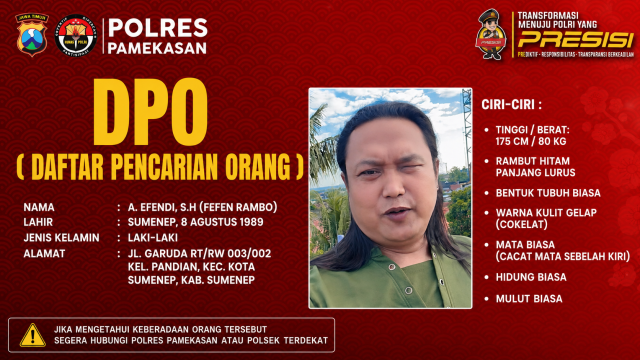
YAKUSA.ID – Polres Pamekasan membuka kanal pelaporan melalui WhatsApp Kapolres Pamekasan di nomor 0821-3213-3636 guna memudahkan masyarakat menyampaikan informasi terkait keberadaan seorang daftar pencarian orang (DPO) yang diduga terlibat dalam tindak pidana administrasi kependudukan dan/atau pelanggaran perlindungan data pribadi. Dalam pengumuman resmi yang dirilis Polres Pamekasan, masyarakat yang mengetahui atau melihat keberadaan DPO tersebut diminta […]