To change the background click on the label bar and in the layer window select the style tab.
Choose a source from the background top tab then upload an image or pick a background color.


To change the background click on the label bar and in the layer window select the style tab.
Choose a source from the background top tab then upload an image or pick a background color.

To add a layer, click the green plus button in the left sidebar and select the type of layer.
Select any layer and you can edit its content and style properties in the layer window.


To change the background click on the label bar and in the layer window select the style tab.
Choose a source from the background top tab then upload an image or pick a background color.

To add a layer, click the green plus button in the left sidebar and select the type of layer.
Select any layer and you can edit its content and style properties in the layer window.


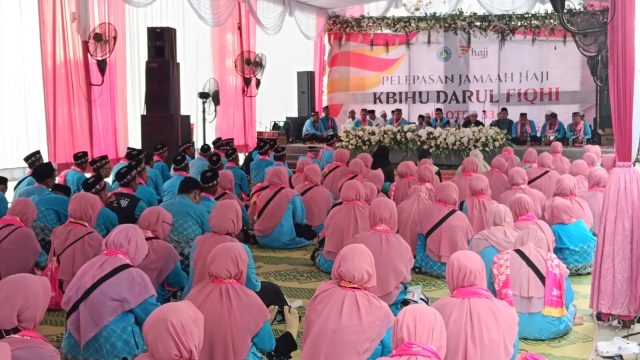
YAKUSA.ID – Sebanyak 267 calon haji yang tergabung dalam Kelompok Bimbingan Ibadah Haji dan Umrah (KBIHU) Darul Fiqhi diberangkatkan menuju Asrama Haji pada Rabu sore, (29/4/2026). Rombongan yang masuk dalam Kelompok Terbang (Kloter) 33 itu dilepas langsung oleh Pimpinan KBIHU Darul Fiqhi Abdul Adzim Mujib di halaman Stadion Surajaya, Lamongan. Ratusan keluarga tampak memadati lokasi […]