To change the background click on the label bar and in the layer window select the style tab.
Choose a source from the background top tab then upload an image or pick a background color.


To change the background click on the label bar and in the layer window select the style tab.
Choose a source from the background top tab then upload an image or pick a background color.

To add a layer, click the green plus button in the left sidebar and select the type of layer.
Select any layer and you can edit its content and style properties in the layer window.


To change the background click on the label bar and in the layer window select the style tab.
Choose a source from the background top tab then upload an image or pick a background color.

To add a layer, click the green plus button in the left sidebar and select the type of layer.
Select any layer and you can edit its content and style properties in the layer window.


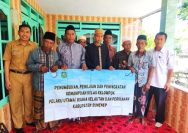
YAKUSA.ID – PT Pegadaian Kantor Wilayah XII Surabaya melaksanakan Program Pegadaian Peduli Dhuafa Tahun 2026 dalam rangka memperingati Hari Ulang Tahun ke-125. Bantuan yang disalurkan kepada 560 penerima manfaat di Jawa Timur itu, berupa paket sembako dan perlengkapan panti yang disesuaikan dengan kebutuhan masing-masing penerima. Penyaluran bantuan dilakukan serentak pada 1 April 2026 di wilayah […]